



Vistek Camera Store
Cart My Account Contact Us
Search!
products rentals clearance
Select your department
  • Shop
  • Pro Photography
  • Pro Video
  • Rentals
  • Clearance
  • Photofinishing
  • Community
  • Cameras
  • Camera Accessories
  • Camcorders
  • Computers
  • Electronics
  • Printers
  • Display & Media

  • Account Overview
  • My Wishlist
  • Help Centre
  • Shipping
  • Email my Cart
5 of 92   Browse: Imaging Software
« Adobe Lightroom V5.0.. | Nikon Capture Softw.. »

Adobe Lightroom V5.0 Multi-Platforms Retail Universal English (65215211)

Nikon Capture Software NX2
Software » Imaging Software » Phase One C1 Pro Capture One Software En..

Phase One C1 Pro Capture One Software English

Phase One  

Phase OneC1 Pro Capture One Software English
Phase OneC1 Pro Capture One Software English 1
Phase OneC1 Pro Capture One Software English 2
Phase OneC1 Pro Capture One Software English 3
Phase OneC1 Pro Capture One Software English 4
Phase OneC1 Pro Capture One Software English 5
Phase OneC1 Pro Capture One Software English 6
Phase OneC1 Pro Capture One Software English 7
Phase OneC1 Pro Capture One Software English 8
Phase OneC1 Pro Capture One Software English 9
Phase OneC1 Pro Capture One Software English 10
Zoom +

Close »
Phase OneC1 Pro Capture One Software English
Phase OneC1 Pro Capture One Software English 1
Phase OneC1 Pro Capture One Software English 2
Phase OneC1 Pro Capture One Software English 3
Phase OneC1 Pro Capture One Software English 4
Phase OneC1 Pro Capture One Software English 5
Phase OneC1 Pro Capture One Software English 6
Phase OneC1 Pro Capture One Software English 7
Phase OneC1 Pro Capture One Software English 8
Phase OneC1 Pro Capture One Software English 9
Phase OneC1 Pro Capture One Software English 10

Close »
WebCode: 212382 Mfr item: 88071000
Price: $299.95

Share this PageSafe Shopping Shipping Write a Review Add to wish list Print Page
  • Overview
  • Detailed Specs
  • Resources

Phase One C1 Pro Capture One Software English

The professional choice in imaging software

Capture One Pro 7 is the world’s best raw converter rendering precise colours and incredible detail with support for leading high-end cameras. It contains flexible digital asset management, all the essential adjustment tools and fast performance in one customizable solution.

Think of Capture One Pro 7 as your digital assistant, allowing you to focus on capturing your vision. With its image quality, reliability and speed, it gives you an array of powerful tools and the freedom to create.

New in Capture One Pro 7

Built on the world's best raw processing engine, Capture One Pro 7 is the professional choice in imaging software. It gives photographers the highly responsive, precision tools they need to create stunning out-of-the-box images from leading high-end cameras. With a fast and intuitive workflow, it can be customized to fit unique project requirements.

More than 100 new features in Capture One Pro 7 support you with infinite possibilities to organize, adjust, and showcase your work. Go with the professional solution to help you and your photography excel.

Click here for an extensive collection of tutorial videos from Phase One.

Key Features

  • Raw processing - The unique raw processing engine ensures the best results from your raw files with natural colors and great detail out-of-the-box.
  • Tailor-made camera profiles - Each camera is tested by our image quality experts to create a tailor-made and optimized profile to bring out the very best in your camera.
  • World-class noise reduction - Shoot with higher ISO more confidently than ever before, and Capture One Pro 7 will produce a crisp and noise-free image.
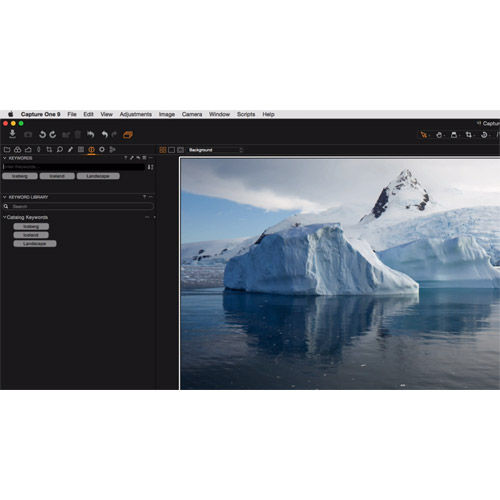
  • Catalogs - Select and organize your images using catalogs, with comprehensive digital asset management and powerful virtual organization. Open several at once, shared them or take them with you.
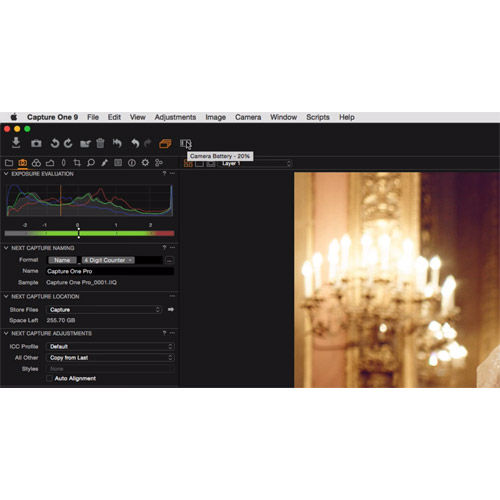
  • Instant tethered capture - Shoot directly into the application, instantly apply styles, speed up image composition and lighting with Live View, and let your clients follow the shoot remotely with Capture Pilot.
  • Customizable interface - Capture One Pro 7 never restricts you to a set workflow. Customize your workspace to make your personal workflow more efficient and experience a leap in productivity.

Image quality revolution

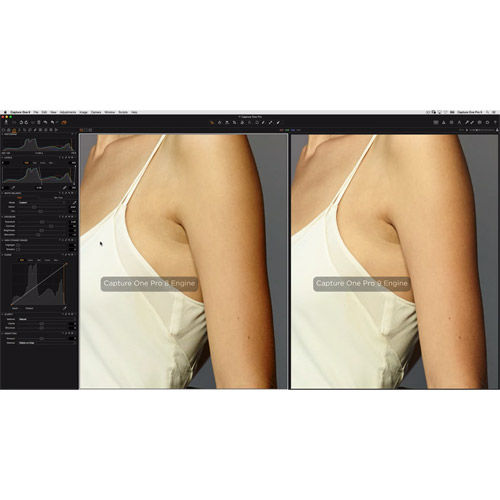
Capture One Pro 7 introduces an image quality revolution with a brand new image processing engine. The Capture One 7 Processing Engine, together with our tailor-made camera profiles, provides the professional photographer with improved noise reduction, improved high dynamic range, improved clarity, even better detail and much more.

Raw processing engine
Capture One Pro 7 features the world’s most advanced image processing engine, with a brand new Bayer Interpolation Method, that will allow you to achieve vastly superior image quality with excellent color and fine detail from your camera’s raw files.

Tailor-made profiles
Capture One Pro 7’s tailor-made camera profiles are renowned for providing ultimate image quality for leading DSLRs. Each supported camera is tested and fine tuned extensively by our image quality team to create a bespoke profile that brings out the very best.

It's in the detail
Get the composition right in camera, and the software will help you secure the details. Building upon advanced mathematics and years of expertise, Capture One Pro 7 will bring out incredible detail and precise colors in your images.

Superior adjustment tools

Capture One Pro 7 boasts a complete range of new and improved image editing tools that enable you to adjust large numbers of images very efficiently and effectively. With its easy-to-use precision adjustment tools, it will assist you in achieving the perfect look for every image.

Noise reduction
Professionals will enjoy the improved out of the box noise reduction, especially improved for higher ISO images. To reduce noise, every camera is optimized by our image quality experts. For you as a professional this means you can shoot with higher ISO more confidently than ever before.

Highlight and shadow recovery
Perfect high-contrast scenes by recovering blown out highlights and opening up dark shadows. Use the improved HDR tool to bring out details and contrast in the shadows and highlights, even in images taken under difficult light conditions.

Clarity
Bring out the details in texture and fabrics, reduce haze and improve flat images to make your images more visually appealing. Use the clarity tool to add contrast and saturation, and give your images that extra punch.

Powerful digital asset management

Capture One Pro 7 offers the most comprehensive digital asset management solution with the possibility of working with catalogs and sessions. Utilize the powerful virtual organization of catalogs, or stick to your wellknown photography workflow with even stronger sessions.

Comprehensive catalogs
A catalog is the primary method of photo organization and viewing in Capture One Pro 7. A catalog contains all the information needed to find and display any image added to the Catalog, within one portable and sharable file.

Stronger sessions
Use improved sessions to organize all your work and projects. Sessions enable you to store all files as a complete project that includes RAW files, setting files, library files and output files. Stick with the workflow that suits you.

Search and filtering
The new advanced search and filtering option ensures that you can always find your images quickly and easily with specific criteria. Although your originals are offline, you can still browse, search and even adjust your images.

Instant tethered capture

Use Capture One Pro 7 as an integrated part of your capture process by shooting tethered directly into the application. You can view and examine your images instantly in close-up detail to help make any adjustment choices easy.

Instant tethered capture
Instantly import and view images as you shoot them with the world’s most advanced tethered capture solution. Simply connect your supported camera view and examine your images on-screen in close-up detail. Use the Capture Pilot for iOS or in a webbrowser to view and rate your images away from the computer.

Live View for DSLRs
Capture One Pro 7 now offers Live View for selected DSLRs. The Live View can help speed up image composition, lighting, and focusing adjustments. Live View makes it possible for the photographer and others to easily view an image on a computer screen, in real-time and get the adjustments just right.

Web-enabled Capture Pilot
In addition to using the Capture Pilot App for iOS, you can now access Capture Pilot functionality on mobile devices and any other web enabled device that share the same local wireless network. Use Capture Pilot to view and rate your images away from the computer, while they are being captured.

Intelligent corrections

A host of new workflow enhancers will help you work more efficiently with your images, so you can get to that perfect images even faster.

Automated lens correction
Easily fix classic optical issues like distortion, light falloff and purple fringing quickly and easily with the automated lens corrections. In Capture One Pro 7, your images are automatically adjusted for lens failings, using bespoke profiles for popular medium format, DSLR and ILC lenses.

Improved LCC workflow
The process of working with LCC has now been simplified, making it both easier and faster to work with multiple images in a batch. Within a few clicks you can create LCC profiles for several images at once, and apply them to several images at a time.

Local adjustments
Use the improved local adjustments like gradient mask, fill mask and auto mask, to fine-tune the details in targeted areas of your images. The non-destructive local adjustments let you edit selective parts of an image for unlimited creative control and results.

Addition Features

Adjustable previews
You can use the default preview size or change it to your preference. When you are on the move with catalogs and are browsing your images offline, you can choose to have a large preview to see more detail. When home with the files online you can change to a small preview for convenience and speed.

OpenCL-enabled processing
Tap into the vast computing power in your graphics processor and CPU and use it to accelerate your processing tasks. The new OpenCL processing support will let you experience incredible speed when outputting images from Capture One Pro 7. Images are processed faster than ever before – allowing professional photographers to deliver work even faster to their clients.

Manual sorting
With manual sorting you can get the flow of our image presentation just right. Quickly drag-and-drop the images into the order you desire, and use the order in your slideshow or print layout. Capture One Pro 7 remembers the order if you switch to sort by date or name.

High-speed caching
Using behavior prediction in the background, Capture One Pro 7 is able to predict which images you would like to see next and pre-caches them. Quickly switch between two images in full resolution without spending time on loading.

Process to additional formats
You can now process to several additional file formats. Besides JPEG, TIFF, Capture One Pro 7 offers processing to JPEG XR or JPEG 2000 files with higher or lossless compression, to PNG files, to one-layer PSD files or to calibrated DNG files.

Drag-and-drop tagging
Building on the flexible workflow of Media Pro, Capture One Pro 7 enable you to easily tag images with keywords and metadata by dragging and dropping one or more images onto the keyword.

Flip
Quickly flip your image horizontally or vertically to align perfectly with that magazine layout, overlay or flow of your next photo book.

Save an ICC profile as default per camera
For the photographer with a keen eye for colors hunting for that special look, Capture One Pro 7 allows the user to create custom ICC settings that are used as default for a camera. Once you have decided on your preferred look or color calibration of your camera, having a default setting per camera means not having to choose it, or more importantly remembering to choose it when using different cameras. This gives great convenience and can save you time on set and in post production.

And much more...


Software

  • Anti-Virus/Recovery (1)
  • Event Imaging Software (2)
  • Imaging Software (92)
  • Management Software (7)
  • Video Software (11)
  • VR Software (1)
  • All Software (114)
Shop By Brand Shop By Price

Price Range:

$ to  $ Go

  • Adobe (72)
  • Microsoft (6)
  • Phase One (5)
  • Pinnacle Systems (4)
  • Avid (3)
  • Blackmagic Design (3)
  • Nikon (3)
  • OnOne Software (3)
  • Tiffen DFX (3)
  • Express Digital (2)
  • Silverfast (2)
  • Canon (1)
  • Extensis (1)
  • Fundy Software (1)
  • Kaidan (1)
  • Micromat (1)
  • Nik Software (1)
  • Ortery (1)
  • Sony (1)

Brand Showcase

  • View »

Related Items

  • Computers
  • Accessories
  • Books
Sign up for Vistek Enews today! Get Free Tickets to Canadas largest Pro Photo and Video Expo Click here for accessibility help


McAfee SECURE sites help keep you safe from identity theft, credit card fraud, spyware, spam, viruses and online scams

Vistek Information

  • About Vistek
  • Vistek Store Locator
  • Customer Testimonials
  • Careers at Vistek
  • Link to Vistek.ca
  • eNews Sign Up

Resource Centre

  • Rebates
  • Equipment Rentals
  • Leasing
  • Warranty Information
  • Commercial Sales
  • Events and Seminars

Customer Support

  • Help Centre
  • Service and Repairs Department
  • Privacy Policy
  • Safe Shopping Guarantee
  • Online Policies

Your Order

  • Login to cart
  • Shipping information
  • Return Policy
  • Your wishlist
©2013 Vistek Ltd. E&OE. Prices, specifications, and images are subject to change without notice. Manufacturer rebates, terms, conditions, and expiration dates are subject to manufacturers printed forms. Prices are in Canadian Dollars. Customer service | Website Feedback
  • Digital Cameras
  • Digital SLRs
  • Compact System Cameras
  • Film Cameras
  • Lenses
  • Lenses
  • Filters
  • Mounted Flash
  • Digital Camera Accessories
  • Digital & Film SLR Accessories
  • Tripods & Accessories
  • Bags & Cases
  • Memory Cards
  • Batteries
  • Binoculars & Scopes
  • Camcorders
  • Batteries & Power Supply
  • Camcorder Accessories
  • Video Tapes
  • Professional Video Equipment
  • Computers
  • Computer Accessories
  • Displays & LCD Monitors
  • Storage Devices
  • Software
  • Scanners
  • Blank Media
  • Home Theatre
  • iPods & Music Players
  • Frames & Photo Displays
  • Projectors
  • Screens
  • Lamps, Lenses & Accessories
  • Printers
  • Inkjet Paper
  • Printer Cartridges / Ink
  • Portfolios & Albums
  • Frames & Photo Displays
  • Books
  • Film
  • Printer Cartridges / Ink
  • Inkjet Paper
  • Batteries
  • Memory Cards
  • Blank Media
  • Add to Facebook Facebook
  • Add to Digg Digg
  • Add to Twitter Twitter
  • Add to Google Google
  • Add to Kaboodle Kaboodle
  • Email to Friend Email
  • Add to Del.icio.us Del.icio.us
  • Add to Stumbleupon Stumbleupon
  • Add to MySpace MySpace
  • Add to Diigo Diigo
  • Add to Live Live
  • Email Cart Email Cart