


- Rental ID: R303842-C
Included in Rental
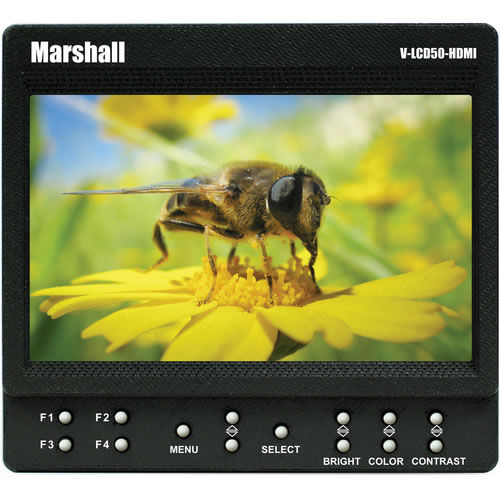
- 1 Marshall Electronics 5"" On Camera Monitor with HDMI
- 1 Marshall Electronics Power Supply for V-LCD50-HDMI
- 1 LEDGO CN-B08 Hot Shoe Adapter Clamp
- 1 TechCraft 3 ft. HDMI to Mini-HDMI 1.3c
Product Highlights
- 5" LCD Field Monitor
- 800 x 480 Resolution
- 200 cd/m2 Brightness
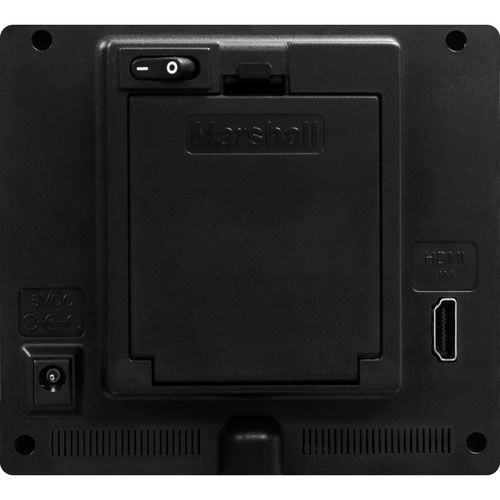
- HDMI/Audio Input
Marshall Electronics V-LCD50 5"" monitor
$90.00/week Add to Request
Overview
The perfect solution for DSLR and video professionals seeking to capture their best shots. Don't be fooled by higher screen resolution or sizes. Marshall Electronics' picture performance, feature set, customer service, and experience is why the industry's leading photographers, videographers, and camera operators prefer Marshall over the competition.
The V-LCD50-HDMI 5" monitor is packed with features found in more expensive models. This compact LED-backlit confidence monitor offers amazing picture performance and excellent viewing angles for users simply looking for a portable, yet versatile monitoring solution. The V-LCD50-HDMI offers standard features including a wide variety of formats and markers, 4 user-configurable front panel function buttons, RGB Check Field / Field Detect, RGB gain and bias control. Major features include Marshall's industry leading FALSE COLOR and PEAKING Filters, along with Image Flip, Freeze Frame, and HDMI Auto Color Space and Ratio detect.
This unit can be battery-powered in the field using 4 AA batteries or the included power supply. The bottom 1/4"-20 mount allows this lightweight unit to be mounted to most DSLRs, cranes, and jibs.
False Colors
The False Color filter is used to aid in the setting of camera exposure. As the camera Iris is adjusted, elements of the image will change color based on the luminance or brightness values. This enables proper exposure to be achieved without the use of costly, complicated external test equipment. To best utilize this feature, you must understand the color chart and have a basic understanding of camera exposure. Normally, when shooting subjects like people, it is common practice to set exposure of faces to the equivalent of approximately 56 IRE. The False Color filter will show this area as the color PINK on the monitor. Therefore, as you increase exposure (open the IRIS), your subject will change color as indicated on the chart: PINK, then GREY, then a few shades of YELLOW. Overexposed subjects (above 101 IRE) on the monitor will be shown as RED. In addition, underexposed subjects will show as DEEP-BLUE to DARK-BLUE, with clipped-blacks indicated with a FUCHSIA-like color. Lastly, the color GREEN is used to indicate elements of the image that are approximately 45 IRE. This represents a "neutral" or "mid-level" exposure commonly used for objects (not people).
Peaking Filter
The Peaking Filter is used to aid the camera operator in obtaining the sharpest possible picture. When activated, all color will be removed from the display and a black-and-white image will remain. The internal processor will display RED color on the screen where sharp edges appear. When the camera operator adjusts (or "racks") the focus control (on the camera lens), different parts of the image will have RED colored edges. This indicates that this portion of the image is sharp or in focus. Final focus is achieved by racking the camera lens focus control back and forth until the desired portion of the image has RED colored edges. Please note that this feature is most effective when the subject is properly exposed and contains enough contrast to be processed.

Product Specifications
| Detailed Specifications | |
|---|---|
| Screen Size (Display Area) | 5-inch Diagonal |
| Resolution (Pixels) | 800 x 480 |
| Viewing Angle | L/R: 85° + U/D: 85° |
| Brightness (in cd/m²) | 200 |
| Contrast Ratio | 400:1 |
| Inputs | HDMI x 1 |
| Dimensions | 4.87"W x 4.39"H x 1.5"D |
| Power Consumption | 4-12V / .7 Amps @ 12VDC |
| Approx. Battery Life | 2 hours |