

- Webcode: 265250 • Mfr: DV/RESSTUD
- FREE SHIPPING Available
Product Highlights
- Video Editing Software
- Professional 8K Editing
- Colour Correction
- Visual Effects & Audio Post Production
- Cut Page Streamlined Interface
- Physical Product Mailed Upon Purchase
Kit Options:
Blackmagic Design Full Davinci Resolve Studio Software & Install Key Ver.18.1
Blackmagic Design Full Davinci Resolve Studio So...- Available in Calgary
- Available in Edmonton
- Available in Ottawa
- Available in Toronto
- Toronto In Stock
- Ottawa In Stock
- Mississauga On Order
- Calgary In Stock
- Edmonton In Stock
Overview
announcement This package includes the Install KEY for the full version of Resolve.
You can then update to the latest available version by downloading it online here.
Resolve 18 is now available.
If packaging indicates an older version, please note that the Install KEY is still valid.
Users who currently have version 17 can update to v18 for free.
This product is included in a physical package that will be mailed to you, upon purchase.
* Blackmagic Design software products are final sale.
DaVinci Resolve 18
Studio Software & Install Key
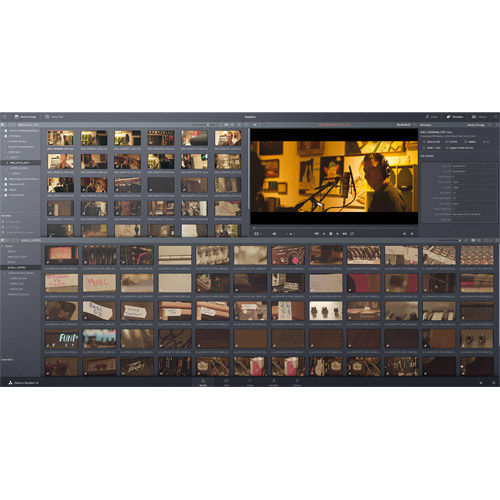
DaVinci Resolve is the world’s only solution that combines editing, colour correction, visual effects, motion graphics and audio post production all in one software tool. Its elegant, modern interface is fast to learn and easy enough for new users, yet powerful for professionals. DaVinci Resolve lets you work faster and at a higher quality because you don’t have to learn multiple apps or switch software for different tasks. That means you can work with camera original quality images throughout the entire process. It’s like having your own post production studio in a single app. Best of all, by learning DaVinci Resolve, you’re learning how to use the exact same tools used by Hollywood professionals.
* Cable not included.
Cloud Collaboration
Blackmagic Cloud
DaVinci Resolve 18 supports Blackmagic Cloud, so you can host your project libraries on the DaVinci Resolve Project Server in the cloud. Share projects and work collaboratively with editors, colourists, VFX artists and audio engineers on the same project at the same time, anywhere in the world.
Blackmagic Proxy Generator
The new Blackmagic Proxy Generator App automatically creates and manages proxies from camera originals. Create a watch folder and new media is automatically converted into H.264, H.265 or ProRes proxies to accelerate editing workflows. You can extract proxies into a separate folder for offline work.
Simplified Proxy Workflow
Switch between camera original footage and proxies in a single click. With Blackmagic Proxy Generated proxies, DaVinci Resolve knows where in the file tree to find them, instantly linking to the camera originals in the media pool. Edit with proxies, then relink to camera originals to grade.
Intelligent Media Management
DaVinci Resolve 18 adds intelligent media location management, so that when you are collaborating you can quickly link media to your unique file paths. Now you don’t need to manually relink or search for assets when you work remotely. So you have more time for creativity and less time on file admin.
Shared Project Libraries
The collaboration update also provides major performance enhancements if you are using a secure private network. Get immediate updates of editorial and colour changes when collaborating on a remotely hosted project library. Now creative decisions can be made in real time based on the latest changes.
Remote Monitoring Streaming
Live stream your DaVinci Resolve Studio viewer and display on a remote computer monitor, or a reference grading monitor, via DeckLink to anywhere in the world. The extremely low latency and high quality 12-bit image is ideal for remote editing or colour grading giving you instant feedback on changes.
Colour
Intuitive Object Mask
Located in the magic mask palette, the new object mask is able to recognize and track the movement of thousands of unique objects. The DaVinci Neural Engine intuitively isolates animals, vehicles, people and food, plus countless other elements for advanced secondary grading and effects application.
Automatic Depth Map
The new depth map effect lets you instantly generate a 3D depth matte of a scene to quickly grade the foreground separately from the background, and vice versa. You can bring attention to action in the foreground, help interview subjects stand out, or add atmosphere in the background of a scene.
Track Moving Warped Surfaces
Apply graphics to surfaces that warp or change perspective in dramatic ways, like t-shirts, flags, or even the side of a face. The surface tracker’s customizable mesh follows the motion of a textured surface. Apply graphics, composite tattoos, or even cover up logos with this powerful tracking tool.
Updated Resolve FX Beauty
Ultra beauty gives you advanced control over a subject when performing corrective beauty work. Developed with professional colourists, the ultra beauty tool helps to address general imperfections by smoothing skin and then recovering detail to produce natural and complimentary results to the subject.
Edit
Enhanced Subtitles
Subtitle support has been expanded to include TTML and XML timed texts and embedded MXF/IMF subtitles. View and import subtitles from media storage, create regions to support multiple simultaneous captions per track, and set individual presets and text positions when indicating different speakers.
Reverse Shape, Iris and Wipe Transitions
Transitions in the effects library’s shape, iris and wipe categories now have a checkbox, allowing you to easily reverse the direction of the transition. This gives you additional flexibility when using these types of transitions, as well as adding to your creative possibilities.
View 25 Simultaneous Multicam Angles
A new 5x5 option in the multicam viewer now allows you to view up to 25 different angles in a single multicam clip at the same time. Ideal for large multicam projects, this makes viewing, cutting and switching between more angles much easier, rather than moving between pages to see different angles.
YouTube and QuickTime Chapter Markers
When delivering to QuickTime formats or uploading directly to YouTube, you can choose to automatically create chapter markers from one set of coloured timeline markers. This means viewers can easily go to the relevant part of your video. All you need to do is add and rename markers to your timeline.
Fusion
GPU Accelerated Fusion Paint
In DaVinci Resolve 18, GPU acceleration allows paint brush strokes to be generated and displayed in real time, for a more intuitive approach when performing cover up work or graphic design. Instant visual feedback allows you to assess your work and make corrections in any stroke style or shape.
Text and Shape Acceleration
Text, text+ and shape templates have improved speed and playback performance in DaVinci Resolve 18. New memory management and data handling means that Fusion templates are up to 200% faster. You can see accelerated results in the viewer and put together motion graphic compositions faster than ever.
Fairlight
Convert Legacy Projects to FlexBus
FlexBus is Fairlight’s flexible audio busing and routing system designed for managing high track counts, extensive plug-in processing, perfect synchronization and multiple project deliverables. Now you can effortlessly convert legacy fixed bus Fairlight projects to FlexBus with a single click.
Automatic Binaural Rendering
The Dolby Atmos deliverable toolset has been expanded to support rendering of a binaural output from a complex Dolby Atmos mix. Now a Dolby 7.1.4 mix can be rendered to playback in a pair of headphones while maintaining the immersive sound experience from just two audio channels.
Improved Decomposition of Nested Timelines
New options in the decompose menu enhance collaboration allowing editors to compile their work to a single timeline. Nested timelines can now be decomposed with all track data including FX and automation. Assignments will connect using new busses, existing paths or new tracks can be left unpatched.
Innovative Space View 3D Display
DaVinci Resolve supports the latest industry standard audio formats natively, including immersive audio formats like Dolby Atmos, Auro 3D, MPEG-H, NHK 22.2, and SMPTE. The space view scope displays a real time view of every object and its relationship to the room and other objects in 3D space.
Next Generation Engineering
DaVinci Resolve 18 features some of the most cutting edge technology in the industry today. The DaVinci Neural Engine is an advanced machine learning system powering many of the software’s most powerful tools, and it is fully supported in Apple M1 Mac models including M1 Ultra. Inclusion of the latest version of Dolby Vision means that users can view HDR on supported monitors, including on laptops. The future proof DaVinci Wide Gamut and Intermediate log grading environment allow you to work on media from any source. You can deliver to every projection and monitoring standard in use today. Plus DaVinci Resolve is the only software that you can use to edit and grade 8K footage in real time.
DaVinci Neural Engine Acceleration
The advanced machine learning algorithms of the DaVinci Neural Engine are supported on Apple’s M1 and M1 Pro models. This gives you up to 300% speed improvement in dozens of tools that rely on accurate automated analysis of motion and content such as Smart Reframe, SpeedWarp or SuperScale.
Laptop HDR Monitoring
Increased Dolby Vision support now includes the latest version of Dolby Vision, which offers HDR viewing on Apple displays that feature high dynamic range options. This includes XDR displays and even the latest laptops, which means you can review, grade and deliver HDR footage from anywhere.
Atmospheric Simulation
Quickly generate randomized noise data to replicate different types of atmosphere and particle like effects. Use the presets to generate smoke and mist effects. Advanced parameters let you create a distinct appearance or movement in the noise. You can even warp images using the displacement map.
Edge Detection
Improved edge strength and filter controls in the edge detect effect produce more natural results than ever. The gamma control allows for cleaner edges and a smoother rolloff. The half edge setting displays either the light or dark side of the edge, allowing for unique sharpening and halo effects.
DaVinci Wide Gamut Colour Space
DaVinci wide gamut and intermediate are timeline colour space and gamma standards that provide a universal internal working colour space. It’s larger than what cameras can capture, even larger than BT.2020, ARRI wide gamut and ACES AP1. You’ll never lose image quality, no matter where it comes from.
8K Real Time Colour Correction
Only DaVinci Resolve supports 8K digital negative debayering editing and grading in real time. Working directly on RAW footage when compositing and grading ensures the most accurate results, to avoid limited resolutions, compression artifacts and banding that might impact your creative decisions.
M1 Ultra Performance
Support for the new Apple M1 Ultra means faster playback than ever before, including 30x faster playback on multicam 8K timelines. Collaborative workflows and wider support of RAW formats means feature film productions are increasingly adopting faster turnarounds using original camera media.
Technology and Creativity
DaVinci Resolve provides some of the most intelligent AI and advanced feature algorithms available in post production. These tools produce quick, accurate results that will elevate the visual quality of your project while saving you hours of time. The magic mask needs only a single stroke to locate and track people, features, and objects. Smart reframe repurposes footage to dramatically different aspect ratios by recognizing the action in a scene and panning within it. Tools like object removal and the patch replacer allow you to remove unwanted equipment from a scene with the click of a few buttons. Plus the tracker has been the industry leader for over 20 years.
Person Mask
The magic mask palette uses the DaVinci Neural Engine to detect people, tracking their movement in a shot. This person mask produces clean traveling mattes for secondary grades or effects. You can make characters stand out in an under lit shot, or invert the person mask and stylize the background.
SuperScale
This unique upscaling algorithm creates new pixels when increasing the resolution of an image. The newly generated data has more detail in upscaled images than standard resizing controls. Ideal for scaling archival footage into modern resolutions, or upscaling HD footage to match a 4K or 8K project.
Smart Reframe for Social Media
Now you can use 16:9 HD or Ultra HD and quickly create square or vertical versions for posting to Instagram and other apps. The DaVinci Neural Engine automatically identifies action and repositions the image inside a new frame so you don’t have to do it manually. You can even fine tune the results.
Stylize with OpenFX Library
The Open FX library features over a dozen stylize effects that can artistically modify the content of the image. Ranging from the creative, like pencil sketch, halation and abstraction, to the practical like blanking fill, these effects analyze the content of a shot to produce striking imagery.
Face Refinement
The sophisticated face refinement filter uses facial feature recognition to automatically detect and track faces. Use its many parameters for general beauty work, like skin smoothing, for correcting unflattering colour casts, and for retouching individual features like eyes, lips and cheeks.
Dead Pixel Fixer
Dead pixels in a camera sensor will often appear as static white dots and could affect hundreds of shots before they are noticed. Click on the white dots in the viewer, and the dead pixel fixer will use the surrounding pixel data to cover them up, rescuing your footage and preventing reshoots.
Object Removal
The perfect tool for covering up moving objects in an otherwise static shot, object removal analyzes a scene and uses the background information to paint out unwanted data. Create a Power Window on a new node, track the unwanted object, and link to the effect node. Watch it vanish before your eyes.
Patch Replacer
Sample an area of your scene to quickly cover up unwanted elements, like boom mics or even blemishes on a face. The patch replacer has a fantastic auto grading feature that will seamlessly blend the covered area with the surrounding colour data, even when there is movement or changes in the light.
Tools for Content Creators
Upload Directly to YouTube, Vimeo, Twitter
Link your social media accounts to DaVinci Resolve in order to upload videos directly to YouTube, Vimeo and Twitter as you export. Compression settings have been developed based on each site’s best recommendations, meaning your videos will be optimized for visual quality and playback speed.
Import ATEM Mini Projects
Live production projects from ATEM Mini ISO models can be opened as a timeline. The sync bin with multiview lets you fine tune edits from the original live production or even replace shots. You can use the ISO recordings from ATEM or relink to Blackmagic RAW camera files for finishing in Ultra HD.
Advanced Noise Reduction
Two powerful tools restore noisy digital footage, even if captured in low light. The GPU accelerated temporal noise reduction algorithm removes noise while intelligently retaining areas of high detail. While the spatial noise tool analyzes the remaining noise pattern to lift it from the image.
Optical Flow Speed Change
The advanced retiming algorithm analyzes a scene’s content, building new frames so you can slow down and extend the action in a sequence without repairing or blending frames into each other. Every frame created with optical flow is sharp, and intelligently constructed from existing visual data.
Mix 2,000 Tracks in Realtime
Fairlight Audio Core is a low latency, next generation audio engine that intelligently manages workloads by using all CPU cores. That means sound elements can be split into as many tracks as needed. You get up to 2,000 tracks, each with real time EQ, dynamics and 6 plug-ins, all on a single system.
Track and Follow Objects
The tracker palette lets you effortlessly follow objects and people to apply secondary grading or effects. When a window is placed on a subject, the tracker can follow its contents in 3D space, resulting in a quick and accurate mask. You can easily emphasize vital elements of a scene.
Colour Warper for Refined Grading
The mesh based warping tool lets you adjust two colour parameters at once. You can adjust both hue and saturation or chroma and luma. Adjustments are made by dragging control points, with smooth falloff for clean, natural looking adjustments. It’s a new way to transform colour in your images.
Hardware and Software Integration
Streamline your workflow with editing keyboards, grading panels and audio consoles designed to work with DaVinci Resolve software. Faster than just software, dedicated features are placed directly at your fingertips. Adjust multiple parameters simultaneously on the same panels used in Hollywood.
What's Included
DaVinci Resolve Studio Software & Install Key (Full Version)Reviews
- Was this review helpful? Yes (1) No (4)
- Flag as Inappropriate
- Was this review helpful? Yes (1) No (4)
- Flag as Inappropriate
- Was this review helpful? Yes (6) No (1)
- Flag as Inappropriate
- Was this review helpful? Yes (6) No (1)
- Flag as Inappropriate

- Was this review helpful? Yes (4) No (1)
- Flag as Inappropriate
- Was this review helpful? Yes (4) No (1)
- Flag as Inappropriate
- Was this review helpful? Yes (4) No (1)
- Flag as Inappropriate
- Was this review helpful? Yes (4) No (1)
- Flag as Inappropriate
Really love having the full version and so much more powerful
- Was this review helpful? Yes (4) No (1)
- Flag as Inappropriate
- Was this review helpful? Yes (4) No (1)
- Flag as Inappropriate
- Was this review helpful? Yes (11) No (1)
- Flag as Inappropriate
- Was this review helpful? Yes (11) No (1)
- Flag as Inappropriate
- Was this review helpful? Yes (6) No (1)
- Flag as Inappropriate
- Was this review helpful? Yes (6) No (1)
- Flag as Inappropriate
- Was this review helpful? Yes (4) No (1)
- Flag as Inappropriate
- Was this review helpful? Yes (4) No (1)
- Flag as Inappropriate
I recommend this product for anyone who is serious getting into video editing.
- Was this review helpful? Yes (3) No (1)
- Flag as Inappropriate
- Was this review helpful? Yes (3) No (1)
- Flag as Inappropriate
- Was this review helpful? Yes (3) No (1)
- Flag as Inappropriate
- Was this review helpful? Yes (3) No (1)
- Flag as Inappropriate

Questions & Answers


- Reply
- Inaccurate
- Martin L on Dec 6, 2018
- Purchased on Apr 16, 2018
Thanks,J.
- Reply
- Inaccurate
- Joshua M on Aug 19, 2021
- Purchased on Oct 11, 2020
Is this activation card version?
Thanks!
- Reply
- Inaccurate
- Donald C on Jun 12, 2019
- Purchased on Dec 12, 2018
Blackmagic Design Full Davinci Resolve Studio Software & Install Key Ver.18.1
Looking for a personal touch? Not sure if you are choosing the right product? Our staff is here to help.
We want to make sure you get the right product for your needs.
Our staff will help you understand the options available so you can be confident in your purchase.
As the country’s leading Professional Imaging retailer, Vistek is in the perfect position to ensure you make the right choice.
Contact us today for a personal touch.