

- Webcode: 477044 • Mfr: RODP-WIRELESSGO2RX
Product Highlights
- 200 m (600') Range
- Omnidirectional Pickup Pattern
- 50Hz – 20kHz Frequency Range
- 3.5mm TRS Analog Input / Output
- USB Type-C Connection
- macOS 10.11 / Windows 10 OS
Rode Replacement Wireless GO II Receiver (RX)
Rode Replacement Wireless GO II Rec...- Toronto Special Order
- Ottawa Special Order
- Mississauga Special Order
- Calgary Special Order
- Edmonton Special Order
For Québec residents: See our Bill 29 Disclosure at the bottom of this page or click here for more info.
Overview
Wireless GO II Receiver
The Dual Channel Receiver
The Wireless GO II features two transmitters and a dual channel receiver that allows you to connect both transmitters for recording two sound sources into a single device. Out of the box, the transmitters come auto paired to the receiver and will remember which channel they’ve been assigned to, so you don’t have to worry about pairing them again.
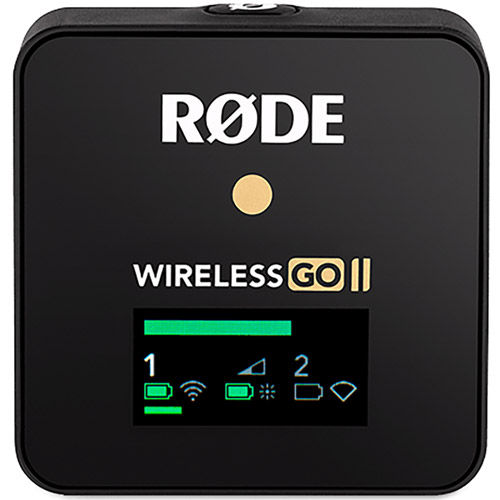
The receiver’s LED screen is split into four main sections, with icons for battery life, signal strength and input level displayed for each transmitter on the bottom left and right, and icons for battery life, backlight mode and output gain for the receiver in the middle. Above this is an output level meter for the receiver, which makes it easy to monitor the levels going into your camera or recording device and ensuring your signal isn’t too hot.
Turning On and Pairing Your Wireless GO II
To turn on your Wireless GO II, simply press and hold the power button on the receiver. To pair your transmitters to the receiver, press and hold the power button on the transmitters one at a time. Once turned on, they will automatically pair to the receiver. This should take a few seconds. If a transmitter loses connection with the receiver, the blue ‘∞‘ LED on the transmitter will flash and the icons for that channel will go blank on the receiver, making it easy to identify which one you need to reconnect.
If you need to reconnect a transmitter to the receiver, press and hold the pair button (‘∞‘) on the receiver for three seconds to enable pairing mode, then single-click the power button on the transmitter and wait a few seconds. To disconnect a transmitter, select it by single-clicking the pair button, then press and hold the pair button for three seconds.
Channel Selection & Mute Control
Channel Selection
As mentioned, clicking the pair button on the receiver will allow you to cycle between the two transmitters. A single click will select transmitter 1, a second click will select transmitter 2, and a third click will exit the channel selection. Note this will only work when the transmitters are turned on and paired to the receiver. This allows you to connect and disconnect the transmitters and also mute them.
Mute Control via the Receiver
Once the desired transmitter has been selected via the channel selection, single-click the gain control/mute button to mute it. This is useful when the camera operator needs to quickly mute one of the transmitters.
Gain Control
The Wireless GO II has flexible gain controls that allow you to precisely tailor the receiver’s output to avoid clipping or distortion in your recording device. The gain control is found on the receiver. This is a three-stage pad that cuts your output level in 12dB increments. A single click of the gain control button will allow you to select between high (0dB), medium (-12dB), and low (-24dB) gain settings. The level icon in the middle of the screen indicates which gain setting is selected. An additional fine gain control mode can also be enabled in the RØDE Central app. See below for more information.
*Note: The gain control only affects the 3.5mm output of the Wireless GO II, not the digital USB-C output. If you are using the Wireless GO II with a smartphone or computer and need to adjust your gain, do so in your recording software or app.
For Québec Residents – Disclosure Under the Consumer Protection Act
In compliance with Bill 29, Vistek does not guarantee the availability of replacement parts, repair services, or maintenance or repair information for products sold by Vistek.
Coverage provided through applicable manufacturer warranties, if any, remains in effect. Customers are encouraged to contact the manufacturer directly for information regarding the availability of replacement parts, repair services, or maintenance information.
Reviews
Product Specifications
Wireless GO II Receiver |
|
|---|---|
| Acoustic Principle | Pre-polarised pressure transducer |
| Pickup Pattern | Omnidirectional |
| Frequency Range | 50Hz – 20kHz |
| Max. SPL | 112dB SPL |
| Max. Input Level | -20dBV |
| Microphone Preamp Gain | 20dB |
| Equivalent Noise Level (A-Weighted) | 22 dBa |
| Power Requirements | In-built rechargeable lithiumion battery charged via USB 5V, 0.3A |
| Operating Time | Up to 7 hours |
| Analog Inputs | 3.5mm TRS (lavalier microphone input) |
| Analog Outputs | 3.5mm TRS |
| Transmission Range | 200m (line of sight) |
| Computer Connectivity | USB Type-C |
| OS Requirements |
macOS 10.11 above |
| Weight | RX: 32 g (1.12 oz) |
| Dimensions (mm) | RX Length: 44 Width: 45.5 Height: 18.3 |
Questions & Answers
Rode Replacement Wireless GO II Receiver (RX)
Looking for a personal touch? Not sure if you are choosing the right product? Our staff is here to help.
We want to make sure you get the right product for your needs.
Our staff will help you understand the options available so you can be confident in your purchase.
As the country’s leading Professional Imaging retailer, Vistek is in the perfect position to ensure you make the right choice.
Contact us today for a personal touch.