

Mac 15.0 Sequoia,
Mac 26.0 Tahoe or later.
Windows 10, 64-bit.
Windows 11.
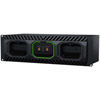
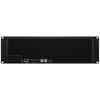
- Webcode: 493617 • Mfr: MEDIA DOCK ULTRA
- FREE SHIPPING Available
Product Highlights
- Mounts Up To 3x Media Modules
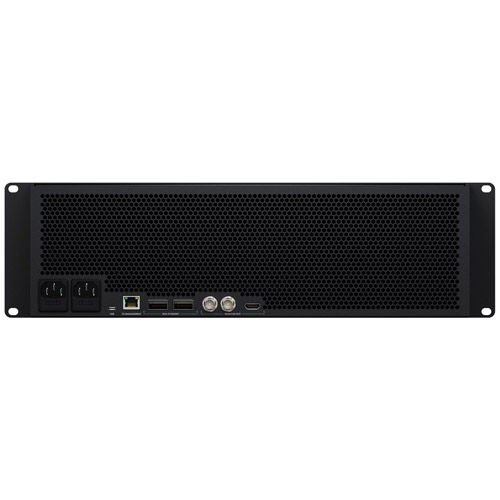
- 2x 100G Ethernet / USB-C / HDMI / 2x BNC Connection
- 100-240 VAC Power Source
Blackmagic Design Media Dock Ultra
Blackmagic Design Media Dock Ultra
$4,465.00
Add to Cart
FREE SHIPPING
Available
Web Availability:
Special Order
This product will be Special Ordered just for you from the manufacturer. We do not stock this item due to its uniqueness or import schedule. Special Order items are Final Sale, see our Return Policy for details.
Vistek Locations
- Toronto Special Order
- Ottawa Special Order
- Mississauga Special Order
- Calgary Special Order
- Edmonton Special Order
For Québec residents: See our Bill 29 Disclosure at the bottom of this page or click here for more info.
Overview
Media Dock Ultra
Blackmagic Design today announced Blackmagic Media Dock Ultra, a new high performance dock for Blackmagic Media Modules with two fully independent 100G Ethernet ports. It also features SDI and HDMI status monitoring and Blackmagic Cloud sync that lets customers use Blackmagic Media Modules as extremely high performance removable storage. The Blackmagic Media Dock models use the same high speed media modules as Blackmagic URSA Cine cameras, so customers get high performance storage that can be instantly removed. That’s perfect for editing media from URSA Cine cameras directly from the modules without copying files. It’s also a perfect solution for recording from the HyperDeck ISO Recorder 100G, as customers can instantly unplug and take the media module with customers as soon as a live production ends. There are two powerful models, one with four 10G Ethernet connections and another with two separate 100G Ethernet connections. They even sync to Blackmagic Cloud.
Key Features:
- Extremely high performance rack mount dock for Blackmagic Media Modules.
- Two independent 100G Ethernet ports for simultaneous recording and editing.
- Blackmagic Cloud sync for global media collaboration.
- Includes SDI and HDMI monitoring output with live storage status.
- Front-to-back cooling with multiple fans for quiet operation.
- Dual redundant AC power supplies for broadcast reliability.
- Localized for 13 popular languages allowing international use.
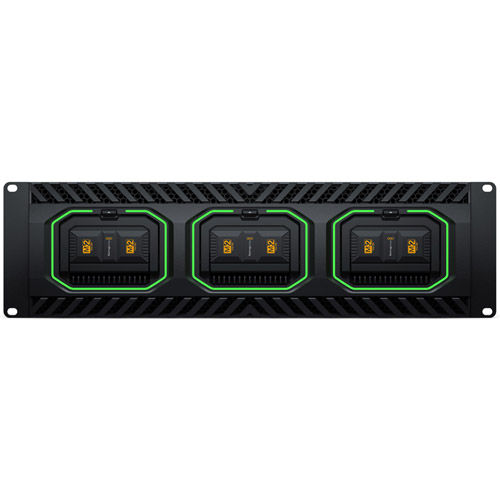
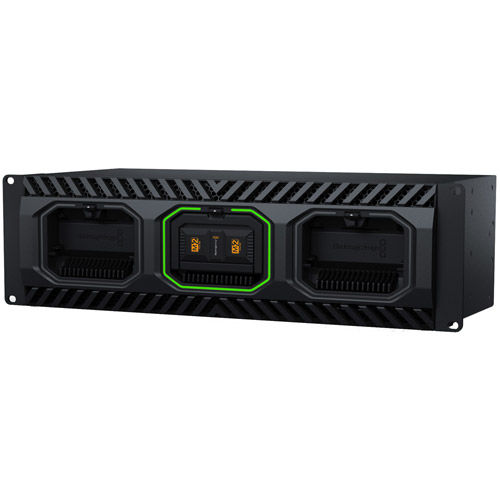
Blackmagic Media Docks feature a rack-mount design holding up to three Blackmagic Media Modules for sharing on their network, using the same modules as URSA Cine cameras. Each module has four M.2 flash memory cards in RAID 0, making them incredibly fast. The design includes illuminated LED rings around each slot, showing reads and writes from the media modules. The Media Dock Ultra model is a dramatically more powerful design with faster network speeds, front-to-back cooling and multiple fans for redundancy and quiet operation. Plus, all models include dual redundant power supplies.
Now creative teams can share a single local cache of media uploaded to the Blackmagic Cloud for a true global workflow. This speeds up work as files are instantly available to everyone without needing to be downloaded from the internet. Customers save space on individual computers as the Blackmagic Media Dock is a central store of all media that’s accessible to everyone on their local network. Customers can even sync multiple Blackmagic Media Docks to different geographic locations so everyone can collaborate globally without latency because everyone is using a local copy of the media files.
Build high end digital film DIT carts and post production workflows with Blackmagic Media Dock. It allows multiple DaVinci Resolve workstations to access recorded files instantly on set, without file copying. This means customers can use DaVinci Resolve for on-set grading. That’s a fantastic workflow when using URSA Cine cameras, which record to Blackmagic Media Modules. Customers can also sync to Blackmagic Cloud to collaborate with off-site colorists and editors.
The most exciting feature is the HDMI and SDI monitoring outputs. Simply connect a monitor to get a live status overview of the Blackmagic Media Dock. The storage map shows a graphic representation of the modules total capacity and also shows reads and writes for the connected users. There are also graphs that show customers the data transfers on the Ethernet connections. The main space indicator shows customers the capacity of the media modules and how much is currently being used. The status for each Blackmagic Cloud sync is also shown.
One of the big advantages of the Blackmagic Media Dock is its private storage that customers fully control. There are no subscriptions to sign up for. There are no monthly license fees. There is no tracking of their usage or data. Customers don’t need to use a paid, cloud based web service to maintain the storage settings because Blackmagic Media Dock includes a free software utility that runs on Mac and Windows. That means customers can run a private network, totally disconnected from the internet.
With 100G Ethernet ports, the Blackmagic Media Dock Ultra model is perfectly designed to work with HyperDeck ISO Recorder 100G for live production. That’s a powerful combination as HyperDeck ISO Recorder 100G can record 8 cameras all at the same time. Files are recorded in broadcast quality ProRes for very high quality. Once customers have recorded separate ISO cameras, customers can edit new programming, or get live action replay with DaVinci Resolve. Even as the files are recording, DaVinci Resolve can still edit the media. The Blackmagic Media Dock Ultra is designed for this use as one 100G port connects to the HyperDeck, while the other can connect to a network switch and editing workstations.
DaVinci Resolve has powerful live action replay features. Adding a Blackmagic Media Dock Ultra lets customers combine HyperDeck recorders, DaVinci workstations and remote cameras for an amazing live action replay system. Then the new multi source viewer allows customers to browse media visually, as clips with matching timecode are displayed in a multi-view. That’s perfect when shots are arriving in real time from remote cameras. Blackmagic Media Dock Ultra has been designed to perfectly support DaVinci Resolve for live sports and replay.
GTIN: 9338716010558
For Québec Residents – Disclosure Under the Consumer Protection Act
In compliance with Bill 29, Vistek does not guarantee the availability of replacement parts, repair services, or maintenance or repair information for products sold by Vistek.
Coverage provided through applicable manufacturer warranties, if any, remains in effect. Customers are encouraged to contact the manufacturer directly for information regarding the availability of replacement parts, repair services, or maintenance information.
Reviews
Product Specifications
Media Dock Ultra |
|
|---|---|
|
100G Ethernet |
2 x 100G QSFP28 connections. Each 100G port can be assigned an independent IP address and subnet mask for up to 200G bandwidth and load balancing when used with a managed switch. |
|
1G Management |
1 x RJ45 Ethernet. Supports 10/100/1000 BASE-T. For Cloud Store Setup utility and software updates. |
|
SDI Monitor Outputs |
2 |
|
HDMI Monitor Outputs |
1 |
|
SDI Rates |
1.5G, 3G. |
| Computer Interface | 1 x USB-C for Cloud Store Setup utility and software updates. |
| Power | 2 x IEC C14 power inputs. |
| Protocol |
NFS (HFS+ formatted disks only) |
| Computer Connections | 50 max. |
| Storage Type | Up to 3 Blackmagic Media Modules. |
| External Storage Format | Blackmagic (formatted in camera) |
| Status Indicator | LED bezel indicator lights around media module bays. |
| Monitor Out Displays | Device Name, storage capacity and use, Cloud Sync status, User Activity, Hardware Status, storage map, network data rate graph. |
| SDI Monitor Out Standards | 1080p50, 1080p59.94, 1080p60 |
| HDMI Monitor Out Standards | 1080p50, 1080p59.94, 1080p60 |
| External Control | USB-C or Ethernet for configuration and software updates. |
| Software Included |
Blackmagic Cloud Setup Utility |
| OS |
|
| Power Supply | 2 x 100 ‑ 240V AC 50/60Hz internal power supplies. |
| Power Inputs | 2 x IEC C14 sockets. |
| Physical Installation | 3 rack units. |
| Operating Temperature | 0° to 40° C (32°to 104° F) |
| Storage Temperature | -20° to 60° C (-4° to 140° F) |
| Relative Humidity | 0% to 90% non‑condensing |
Questions & Answers
Blackmagic Design Media Dock Ultra
Looking for a personal touch? Not sure if you are choosing the right product? Our staff is here to help.
We want to make sure you get the right product for your needs.
Our staff will help you understand the options available so you can be confident in your purchase.
As the country’s leading Professional Imaging retailer, Vistek is in the perfect position to ensure you make the right choice.
Contact us today for a personal touch.